2.2.10.1 Text
Properties of Text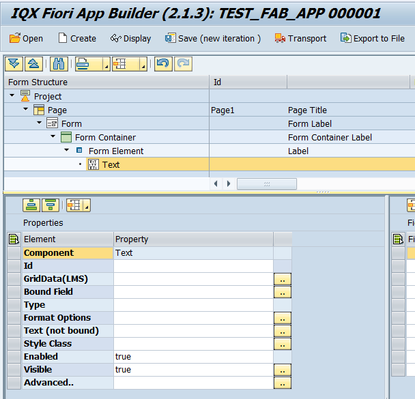
- Id - unique identifier of the control
- GridData(LMS) - control's column values for Large, Medium and Small screens. Please refer to GridData for further details
- Bound Field - the Field Name that links the Control to the Data Model.
- Type - selection for the type of text (e.g. Date)
- Format Options - text format options depending on the type of text selected (e.g. pattern : 'dd/MM/yyyy' for Date)
- Text (not bound) - Free text that can be assigned. Take note that the Bound Field, if assigned, takes precedence and will be rendered in the UI
- Style Class - assign a predefined SAPUI5 CSS or a CSS class defined in the CSS of the App
- Enabled - set a boolean value or a variable with type boolean from the Model to control the enable property
- Visible - set a boolean value or a variable with type boolean from the Model to control the visibility property
Advanced - properties of the control not available in the above list can be added here.
Setting Additional Properties provides further information about the Advanced property
Step-by-step guide
How to add a Text
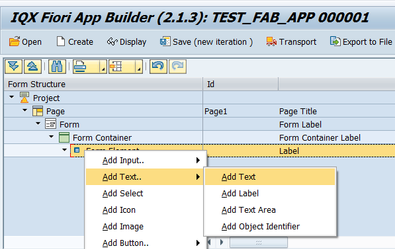
- Right click on a Form Element and select Add Text
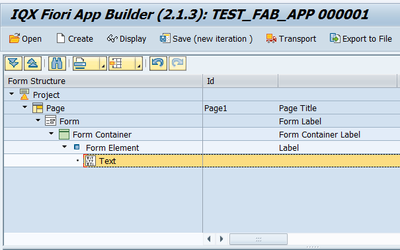
- A Text control has been added
- Title Control added to Add Text. Right click on a Form element → Add Text → Add Title.
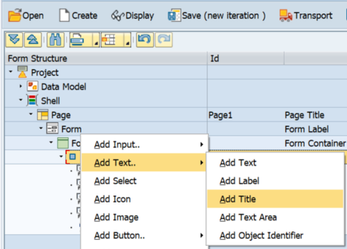
This adds the text as a Title.
Related articles