/
Project
Project
- Charles Evans (Unlicensed)
Owned by Charles Evans (Unlicensed)
Jul 03, 2020
Analytics
Loading data...
This is the topmost node or the core in a FAB Application. The Project Node is automatically added when an application is created.
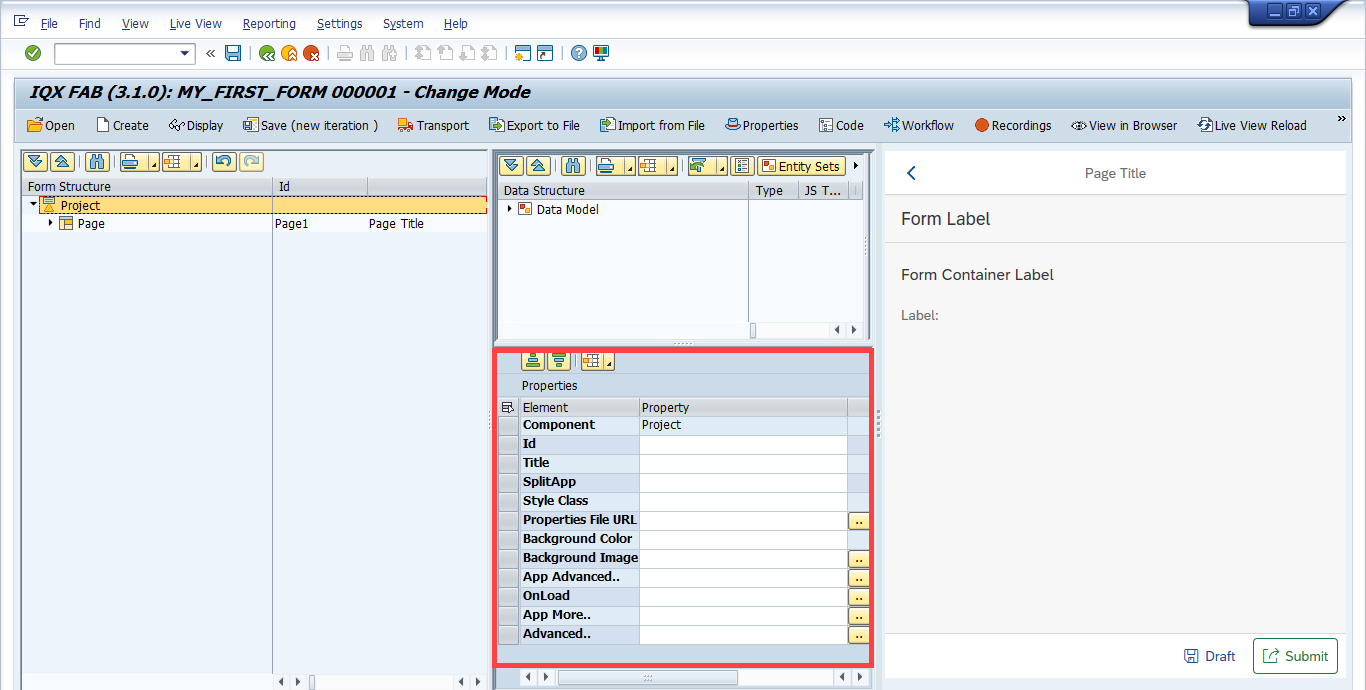
Properties of Project
- ID – unique identifier of the Project.
- Title – title of the project.
- SplitApp – set the value to true if the Master-Detail layout will be used. Otherwise, leave it blank (default to false).
- Style Class - specify a CSS Style Class to be applied to the entire application. Typically this would be 'sapUiSizeCozy' or
'sapUiSizeCompact' for when those standard SAP UI5 Styles are to be applied to create a more compact look for desktop apps for example. - Properties File URL – <insert new inputs here>.
- Background Color – field for setting the background color of the application. hexadecimal value (e.g. #92C632) can be used
- Background Image – field for setting the background image of the application. Set the URL of where the image is stored.
- App Advanced.. – allow for setting advanced features on App or Split App
eg for Split App
defaultTransitionNameDetail="fade"
defaultTransitionNameMaster="fade"
or
defaultTransitionName="fade" - OnLoad - Allows you to configure a JavaScript function to run when the app is loaded.
- App More.. – opens up the More Properties Dialog Screen
Advanced.. – properties of the control not available in the above list can be added here.
Setting Additional Properties provides further information about the Advanced property
More Properties Dialog Screen
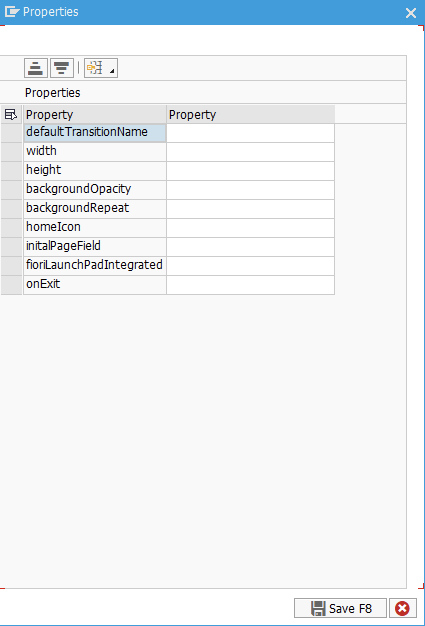
- defaultTransitionName – use the input help to select the transition setting of the app. Leaving it blank will set the transition to "fade" as default.
- width – width setting
- height – height setting
- backgroundOpacity – opacity setting
- backgroundRepeat – background image repeat setting
- homeIcon – home button Icon
- initalPageField – set the ID of a Data Model field that will hold the Id of the Page that will initially be loaded when the App is executed
Related articles
Related content
2.1.1 Project
2.1.1 Project
More like this
Project Properties
Project Properties
More like this
Project Properties
Project Properties
More like this